+61 468 126 464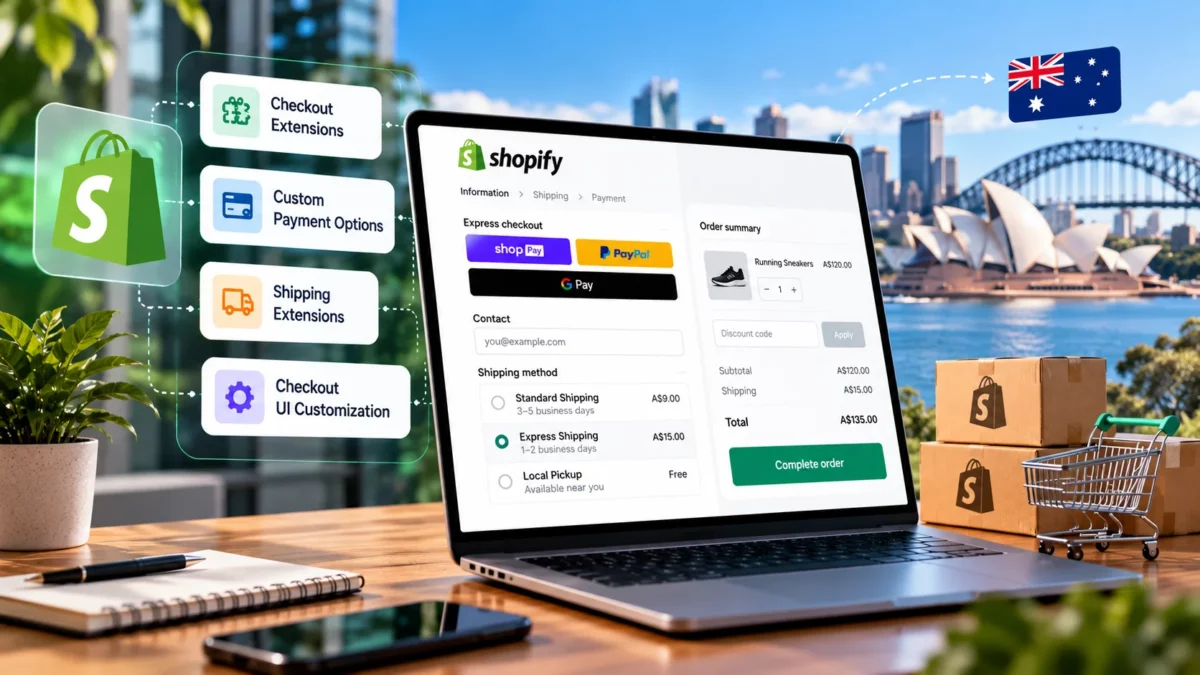

Shopify Checkout Extensibility: What Australian Merchants Need to Know
ShopifyShopify Checkout Extensibility gives merchants a way to customise the checkout experience using supported apps, extension points, branding tools and business logic instead of relying on the older checkout.liquid approach. For Australian ecommerce businesses, understanding these options is important when planning a checkout upgrade, adding custom functionality or improving the customer journey.
A checkout that works well should make it easy for customers to understand their order, choose an appropriate delivery option, complete payment and feel confident about their purchase. However, every store has different requirements. A fashion retailer may need gift-related functionality, while a business selling bulky products may need more specific delivery rules. A growing brand may also need better integration between checkout, inventory, accounting and analytics systems.
Shopify Checkout Extensibility provides a framework for addressing these requirements, but not every feature is available on every Shopify plan. Some customisations can be managed through the checkout editor or an existing app, while others require Shopify Plus and custom development.
This guide explains how Checkout Extensibility works, what Australian merchants can customise, how to approach legacy checkout migrations, what influences implementation costs and how to test changes before launch.
Key Takeaways
What Australian merchants need to know
1
Legacy checkout.liquid sunset dates have passed, so affected customisations need a supported replacement.
2
Checkout UI Extensions on the information, shipping and payment steps are available only to Shopify Plus stores.
3
Map every existing customisation to an app, extension, Function or native setting before you build anything.
4
Test the full purchase journey, integrations and analytics before and after launch.
What Is Shopify Checkout Extensibility?
Shopify Checkout Extensibility is a framework for extending Shopify’s checkout and related customer experiences through supported technologies. These include Checkout UI Extensions, Shopify Functions, web pixel extensions and tools for managing checkout branding.
Previously, some merchants used checkout.liquid to customise checkout pages directly. Shopify has since moved checkout customisation towards its extension-based architecture. Instead of freely modifying the underlying checkout page, developers use the interfaces and capabilities Shopify makes available.
This approach provides a more controlled way to introduce functionality while allowing Shopify to maintain the underlying checkout experience.
How Does Checkout Extensibility Work?
Checkout Extensibility separates different types of customisation into technologies designed for specific purposes.
For example, a merchant may use checkout branding tools to maintain consistent colours and logos, a UI extension to display additional information at a supported checkout location, and Shopify Functions to implement eligible discount or delivery logic.
Web pixel extensions serve a different purpose. They help collect customer interaction data for analytics and marketing measurement.
These technologies are complementary, but they are not interchangeable. A visual component cannot automatically replace backend business logic, and a tracking extension does not provide unrestricted control over the checkout interface.
Shopify also controls where extensions can appear and which APIs they can access. The available options depend on the extension type, target location, Shopify plan and current platform requirements.
For the official technology overview, refer to Shopify’s checkout customisation documentation.
Why Did Shopify Move Away From checkout.liquid?
The older checkout.liquid approach gave eligible merchants a way to customise checkout through a layout file. However, maintaining custom code alongside changes to a hosted commerce platform can create compatibility and maintenance challenges.
Shopify’s extension-based model establishes supported boundaries for adding functionality. Developers can build integrations and interfaces through defined APIs instead of depending on unrestricted access to checkout markup.
This does not mean that every old customisation has an identical replacement. A migration may require redesigning the original functionality, selecting a suitable app or simplifying a workflow.
For merchants, the practical priority is to identify what their existing checkout does, determine which capabilities remain necessary and map each requirement to a supported implementation.
Why Checkout Extensibility Matters for Australian Merchants
Checkout is where customers confirm their order and complete the transaction. Problems at this stage can undermine the experience created by product pages, advertising and customer service.
Checkout Extensibility can help Australian merchants address specific operational and customer experience requirements without treating every change as a complete checkout rebuild.
01
Create a Consistent Brand Experience
Customers should recognise the store throughout the purchase journey. Consistent logos, colours, typography settings and appropriate messaging can make checkout feel connected to the rest of the website.
For example, an Australian skincare brand may want checkout branding to match its product pages, packaging and promotional campaigns. The available branding controls can help maintain consistency, although merchants must work within Shopify’s supported styling options.
02
Support Different Products and Delivery Requirements
A business selling furniture may need to communicate delivery conditions that differ from those for small accessories. A gift retailer may need to collect additional information, while a business selling personalised products may need customers to provide specific order details.
Supported extensions and checkout settings can address some of these requirements. However, merchants should confirm where information can be collected, how it is stored and whether it can be made available to downstream systems.
03
Reduce Customisation Maintenance Risks
Custom code that depends on unsupported checkout behaviour can become difficult to maintain. Extension-based implementations provide a defined development model and can reduce reliance on fragile workarounds.
That does not eliminate the need for maintenance. Apps, API versions, integrations and business requirements still change. A reliable implementation includes compatibility checks, testing and a plan for future updates.
04
Improve Operational Visibility
Checkout-related analytics can help merchants identify where customers encounter errors or abandon purchases. Combined with accurate order and event data, this information supports more informed decisions about user experience and technical improvements.
The objective is not to add as many checkout features as possible. It is to implement the features that solve real customer or operational problems.
“
The objective is not to add as many checkout features as possible. It is to implement the features that solve real customer or operational problems.
Shopify Checkout Extensibility Components Explained
Understanding the main technologies makes it easier to select the right implementation approach.
The 5 building blocks at a glance
01
Checkout UI Extensions
Supported interface elements at designated checkout locations
02
Shopify Functions
Eligible backend logic for discounts, delivery and validation
03
Checkout Branding Tools
Logos, colours, fonts and layout options
04
Web Pixel Extensions
Customer behaviour tracking and analytics
05
Thank You and Order Status Extensions
Post-purchase content, surveys and offers
1. Checkout UI Extensions
Checkout UI Extensions allow developers to add supported interface elements to designated locations in the checkout experience and related pages.
Depending on the extension target and eligibility, possible applications include custom banners, additional input fields, contextual information, product offers and surveys.
Consider a retailer selling products that require special handling. A supported checkout extension might display a relevant notice explaining an important order condition. A merchant may also use a supported field to collect additional information required to fulfil an order.
However, UI extensions do not provide unrestricted control over checkout HTML, CSS or page structure. Developers must use Shopify’s supported components, APIs and extension targets.
Plan eligibility is particularly important. Checkout UI Extensions on the information, shipping and payment steps are available only to Shopify Plus stores. Extensions for supported Thank you and Order status page use cases have different eligibility rules.
Before planning custom functionality, review the current Checkout UI Extensions documentation.
2. Shopify Functions
Shopify Functions allow developers to extend or replace supported parts of Shopify’s backend commerce logic.
Depending on the available Function API, use cases can include custom discount rules, delivery customisation, payment method customisation and cart or checkout validation.
For example, a merchant may need a promotion that applies only when specific products and order conditions are met. A suitable discount Function can implement the relevant logic where the API supports the requirement.
Functions are different from UI extensions. A UI extension presents information or interactions to the customer, while a Function implements eligible business rules.
Public apps using supported Shopify Functions are available on eligible plans, while custom Function implementations have additional plan restrictions. Merchants should confirm current API availability before committing to a design.
3. Checkout Branding Tools
Shopify provides branding controls through its checkout and accounts editor. Depending on the available settings and plan, merchants can configure supported elements such as logos, colours, fonts and layout-related options.
Shopify also provides branding APIs for eligible advanced customisations.
These tools are appropriate when the objective is to maintain a consistent visual identity rather than introduce complex business logic.
For example, a retailer may want its checkout buttons and visual styling to align with the brand’s established design system. The implementation should use supported settings rather than attempting to inject arbitrary CSS into Shopify’s checkout.
4. Web Pixel Extensions
Web pixel extensions support customer behaviour tracking and analytics integrations.
They can help merchants measure relevant events in the customer journey, subject to platform permissions, event availability and the requirements of the connected analytics tools.
For an Australian ecommerce business, useful measurement questions might include whether customers reach checkout, which steps they complete and whether the recorded purchase events correspond with actual orders.
Tracking implementation needs careful validation. Incorrect event handling can produce duplicate conversions, missing purchases or inconsistent reports between analytics platforms.
Merchants should also review their privacy notices, consent mechanisms and data-sharing practices before implementing tracking changes.
5. Thank You and Order Status Page Extensions
The Thank you and Order status pages serve customers after checkout. Supported extensions can add relevant content, surveys and other post-purchase interactions.
For example, a merchant may ask customers how they discovered the store or display useful information about their order. Eligible apps may also support post-purchase offers.
These pages should not be confused with the information, shipping and payment steps. Shopify has different capabilities and plan requirements for each area.
A migration plan should account for the complete purchase journey, including the pages customers see after payment.
UI Extensions vs Shopify Functions
A project may use both technologies when the requirement involves a customer-facing interface and separate business rules.
What Can You Customise With Shopify Checkout Extensibility?
The best implementation begins with a business requirement rather than a particular technology.
Add Custom Fields and Delivery Instructions
Some stores need information beyond standard checkout fields. Depending on plan eligibility, extension targets and available APIs, supported custom fields may help collect relevant details.
Examples include gift messages, delivery instructions or information needed to fulfil a customised product order.
Before implementing a field, determine whether the information is genuinely necessary, whether the customer understands why it is requested and where the value must be stored.
Avoid collecting unnecessary personal information. Additional fields can create friction, particularly when customers are already close to completing a purchase.
Create Conditional Discounts and Delivery Rules
Shopify Functions can support eligible business logic that determines which discounts or delivery options apply.
A retailer may want a promotion to apply only to certain products or delivery options to follow defined business rules. The appropriate implementation depends on the relevant Function API and the store’s configuration.
Test overlapping discounts, invalid combinations, excluded products and boundary conditions. A rule that works for one simple cart may behave differently when customers combine multiple products or promotions.
Add Relevant Offers and Loyalty Information
Eligible extensions and apps can present relevant information or offers at supported points in the customer journey.
The key is relevance. A carefully selected complementary product may be useful, while several competing offers can distract customers from completing their original purchase.
Merchants should evaluate the additional value of an offer against its effect on the checkout experience. Do not assume that adding an upsell automatically improves revenue or conversion.
Improve Branding and Trust
Consistent branding can make checkout feel familiar. Merchants should also communicate important information clearly, including relevant order conditions and delivery expectations.
Any additional message should answer a customer question or help prevent an avoidable misunderstanding. Repeating information already shown clearly on the product page may add clutter without providing meaningful value.
Extend the Post-Purchase Experience
Post-purchase extensions can help merchants gather feedback, communicate useful information or present eligible offers.
For example, a survey can help a retailer understand how customers discovered the store. The information may support marketing decisions when collected and interpreted appropriately.
Every post-purchase feature should have a defined purpose and a way to evaluate whether it improves the experience or provides useful business information.
Shopify Checkout Extensibility Limitations and Shopify Plus Requirements
Checkout Extensibility offers more structured customisation, but merchants need to understand its boundaries before planning a project.
Which Features Require Shopify Plus?
Shopify Plus is required for Checkout UI Extensions placed on the information, shipping and payment steps. Certain advanced branding and custom app capabilities also have Plus-related requirements.
Other features have different eligibility rules. For example, supported Thank you and Order status page extensions and public apps using Shopify Functions may be available on eligible lower-tier plans.
Do not assume that every checkout app requires Plus or that every extension works on every plan. Check the current requirements for the specific app, API and target location.
Plan eligibility at a glance
Always check the current requirements for the specific app, API and target location.
What Can You Not Freely Customise?
Checkout Extensibility is not equivalent to editing a normal Shopify theme template.
Developers cannot assume they can manipulate the checkout DOM, inject arbitrary HTML or override the CSS of Shopify’s provided UI components. The extension must operate within the platform’s supported interfaces and permissions.
If a business requirement depends on unsupported behaviour, the solution may need to change. A different extension target, an existing app or a revised workflow may be more appropriate than trying to recreate the old implementation exactly.
What Happens to Legacy Customisations?
A legacy customisation should be evaluated according to its purpose and current dependencies.
Some features may have suitable app replacements. Others may require custom extensions or a different implementation. Some may no longer be necessary and can be removed.
Shopify’s migration guidance recommends using a suitable public app or building a custom extension when necessary. Its documentation also describes a checkout customisation report that can help merchants review existing implementations.
How Should You Handle Features Without Direct Replacements?
Start by identifying the business outcome rather than copying the original code.
For example, if a legacy script displays a message when a particular condition is met, document the condition, the audience and the required message. Then determine whether a supported UI extension, a Function, a native setting or an app can deliver the same outcome.
This approach helps prevent unnecessary development and makes it easier to compare the cost, complexity and maintenance requirements of different solutions.
How to Migrate From checkout.liquid to Checkout Extensibility
A migration should preserve the important functions of the existing checkout while replacing unsupported implementation methods.
Important update
Shopify’s documented sunset dates for legacy checkout customisations have passed. checkout.liquid is unsupported on the information, shipping and payment steps, and the Thank you and Order status page sunset dates have also passed. Script tags on those pages reached their non-Plus sunset date on 26 August 2026.
Merchants who still rely on affected legacy functionality should review their current implementation and prioritise remediation. Consult Shopify’s official checkout migration guidance before making changes.
Step 1: Audit Your Existing Checkout
Create an inventory of every checkout-related customisation.
Include custom fields, discount scripts, delivery rules, payment integrations, tracking scripts, order-status content and third-party apps. Record the business purpose of each feature and identify who owns it.
For each customisation, document:
- What triggers the feature.
- Which customers or orders it affects.
- What information it reads or changes.
- Which systems depend on its output.
- How the team currently verifies that it works.
This audit prevents a common migration mistake: replacing visible checkout elements while overlooking business logic or tracking dependencies.
Step 2: Map Each Customisation to a Replacement
Create a migration matrix that connects the existing functionality to an appropriate supported solution.
| Existing requirement | Potential solution | What to verify |
|---|---|---|
| Custom checkout message | UI extension or supported app | Target availability and plan |
| Custom discount rule | Shopify Functions or eligible app | Function API and rule behaviour |
| Additional checkout field | Supported UI extension or app | Data handling and target eligibility |
| Customer behaviour tracking | Web pixel extension | Event accuracy and consent |
| Branding changes | Checkout editor or eligible branding API | Available settings and plan |
| Post-purchase survey | Supported Thank you page extension | Page compatibility and data storage |
The table provides a starting point, not a guarantee that every requirement can be reproduced directly. Validate the selected technology against the current documentation.
Step 3: Choose Between an App and Custom Development
An existing app may be the most practical option when it already supports the required feature and fits the store’s plan.
Custom development may be justified when the business needs a specific workflow, integration or rule that suitable apps do not provide.
Compare both options using more than the initial price. Consider subscription fees, implementation time, configuration limits, maintenance, data access and the consequences of relying on a third-party vendor.
A custom app also requires ownership of its code, compatibility updates, monitoring and support arrangements.
Step 4: Rebuild Branding, Logic and Tracking Separately
Do not treat the migration as one large code replacement.
Branding changes should be checked against the supported checkout editor or branding API. Business rules should be mapped to the appropriate Functions or native settings. Tracking should be implemented and validated through supported pixel or analytics integrations.
Separating these workstreams makes it easier to diagnose problems. If a discount behaves incorrectly, the team can investigate the business logic without confusing it with visual styling or analytics configuration.
Step 5: Build and Test Before Publishing
Use the appropriate development or draft configuration to test the implementation before exposing it to customers.
Create test scenarios for successful orders, invalid inputs, discount combinations, delivery restrictions, payment options and relevant customer segments.
Where the store uses external systems, verify that order information reaches the intended destinations. Confirm that the selected extension behaves correctly at the intended checkout location and under the store’s actual plan restrictions.
Step 6: Launch and Monitor
Before publishing, document the approved configuration, test results and rollback or remediation plan.
After launch, monitor checkout errors, order completion, discount behaviour, payment issues and analytics events. Compare results with the baseline recorded before migration.
If an issue appears, investigate whether it originates from the extension, a third-party app, a configuration change or a connected system.
A migration is complete only when the important business requirements work correctly and the team has a process for maintaining the new implementation.
Checkout Migration Support
Still Relying on Legacy Checkout Customisations?
Our Shopify team audits your current checkout, maps each customisation to a supported solution and manages the migration from planning through to launch.
Shopify Checkout Extensibility for Australian Ecommerce
Australian merchants should consider local operational requirements as part of their checkout planning. These requirements do not automatically require custom development, but they can affect which settings, apps and integrations are appropriate.
Shipping and Delivery Expectations
Delivery costs, delivery regions and fulfilment arrangements can influence purchase decisions.
A retailer selling furniture may need different delivery rules from a business selling lightweight accessories. Supported Shopify settings, apps and Functions may help implement eligible delivery logic, while clear product-page information can answer questions before customers reach checkout.
Before building a custom solution, check whether the existing shipping configuration or an established app already addresses the requirement.
Australian Payment and Tax Workflows
Payment availability depends on the store’s configuration, provider eligibility and supported Shopify capabilities. Merchants should verify that the payment methods they intend to offer work correctly for their customers and operating model.
GST-related pricing, tax settings and accounting integrations also need appropriate configuration. Checkout Extensibility does not automatically make a business tax-compliant. Merchants should verify tax settings against their obligations and obtain professional advice when necessary.
Where checkout changes affect order data, test the complete flow from payment through order creation and accounting or fulfilment systems.
Domestic and International Orders
Some Australian merchants sell to customers in multiple markets. Different destinations may involve different delivery options, currencies, tax treatments and operational rules.
Use supported market configuration and regional capabilities where appropriate. Test how checkout responds when customers change delivery addresses or select different markets.
Do not rely on assumptions based solely on a customer’s location or a particular browser setting. Validate the actual store configuration and the data available to the relevant extension.
Accessibility, Privacy and Customer Trust
Checkout interfaces should be clear and usable on mobile devices, with readable messages, understandable labels and accessible interactions.
Merchants should also review what personal information is collected, why it is needed and how it is handled. Extensions and tracking tools must follow applicable platform requirements and the store’s privacy and consent practices.
Australian businesses should review relevant privacy and accessibility obligations against authoritative guidance rather than treating a technical implementation as proof of compliance.
How Much Does Shopify Checkout Extensibility Cost?
There is no single price for a Shopify Checkout Extensibility project. Costs depend on the store’s requirements, current checkout setup, selected plan, app fees, integration complexity and testing needs.
A store that needs only basic branding changes may be able to use Shopify’s built-in editor. A business replacing several legacy scripts, custom discount rules and analytics integrations may need a more substantial project.
Existing App vs Custom Development
An existing app can reduce the amount of code a merchant needs to maintain. However, it may have recurring subscription fees, usage limits or configuration restrictions.
Custom development may provide more control over a specific workflow, but it introduces implementation, testing, maintenance and compatibility responsibilities.
The right decision depends on the total cost of ownership and the importance of the required functionality.
What Influences Implementation Costs?
Key cost drivers include:
01
The number and complexity of existing customisations.
02
The Shopify plan and required extension targets.
03
Third-party apps and external system integrations.
04
Data migration, tracking and analytics requirements.
05
Testing, documentation and launch support.
06
Ongoing updates and maintenance.
A useful estimate should separate discovery, development, integration, QA and ongoing support instead of presenting one unexplained figure.
How to Estimate Your Project Budget
Begin with a checkout audit and a prioritised requirements list. Identify which features are essential, which can use existing apps and which genuinely require custom development.
Ask potential providers to document assumptions, deliverables, dependencies, testing responsibilities and post-launch support. This makes proposals easier to compare and reduces the risk of discovering important requirements after development begins.
Scope and Estimate
Need a Clear Scope for Your Checkout Project?
Work with experienced Shopify developers who document assumptions, deliverables and testing responsibilities up front, so your estimate reflects what the project actually involves.
How to Test and Optimise Your Shopify Checkout
A technically valid extension is not automatically a good customer experience. Testing should cover functionality, usability, integrations and measurement.
Test the Complete Purchase Journey
Check the path from cart to order confirmation, including customer information, shipping, discounts, payment and post-purchase pages.
Use test scenarios that reflect real orders. Include invalid inputs, unavailable delivery options, excluded products and combinations of promotions.
Confirm that each customisation behaves as expected and that customers can still complete the purchase when optional features are unavailable.
Test Different Devices and Checkout Methods
Review the checkout on mobile and desktop devices. Check the layout, readability, input behaviour and visibility of important information.
Test the payment methods and accelerated checkout options relevant to the store. An extension should not create an unexpected obstacle for customers using a supported checkout path.
Validate Integrations and Analytics
Confirm that order data reaches connected systems correctly. Depending on the setup, this may include inventory management, accounting, fulfilment, customer service and marketing platforms.
For analytics, compare recorded purchase events with test orders and actual order records. Investigate duplicate events, missing conversions and inconsistent values before using the data to make business decisions.
Monitor Checkout Performance
Establish a baseline before making significant changes. Useful measures may include checkout completion rate, checkout abandonment, error frequency and the number of successfully completed orders.
Interpret these metrics in context. Changes in traffic sources, product mix, promotions and seasonality can affect results independently of checkout customisation.
Run Controlled Improvements
Choose one clearly defined problem, implement a focused change and evaluate the outcome.
For example, if customers frequently ask about delivery conditions, test whether clearer information at an appropriate point reduces confusion. Do not assume that a new banner or additional field will improve conversion without measurement.
Where possible, use a controlled experiment. If a formal experiment is not practical, compare consistent periods and acknowledge other factors that may explain the results.
Common Shopify Checkout Extensibility Mistakes to Avoid
1. Assuming Every Feature Works on Every Plan
Some checkout customisations require Shopify Plus, while others are available through supported apps or built-in settings on eligible plans.
Check plan requirements before committing to a development design. This avoids spending time on a feature that cannot be deployed in the intended location.
2. Treating Legacy Scripts as Direct Replacements
Old checkout scripts and custom layouts may rely on behaviours that extensions do not support.
Map the business requirement first, then select the appropriate extension or alternative workflow. Reproducing the original code without reviewing the platform’s current capabilities can create unnecessary complexity.
3. Installing Too Many Checkout Apps
Multiple apps can introduce overlapping features, additional configuration and maintenance responsibilities.
Review what each app does, which systems it connects to and whether its functionality overlaps with existing tools. Remove unnecessary components where appropriate, but test carefully before uninstalling anything that may affect order processing.
4. Ignoring Analytics and Integration Testing
A checkout can appear to work while producing incomplete analytics or incorrect downstream data.
Include tracking, order creation, fulfilment and accounting checks in the acceptance criteria. Do not limit QA to the visible checkout interface.
5. Neglecting API and Component Compatibility
Shopify updates its developer platform and supported APIs. Developers should use the current documentation, monitor compatibility notices and maintain supported versions.
Shopify’s current Checkout UI Extensions documentation describes its web component system and its constraints. Teams maintaining older implementations should review the relevant upgrade guidance rather than assume that existing code will remain suitable indefinitely.
How to Choose a Shopify Checkout Development Partner
Merchants should evaluate a development partner on technical capability, implementation discipline and long-term support rather than a promise to customise everything.
Evaluate Relevant Technical Experience
Ask whether the provider understands Checkout UI Extensions, Shopify Functions, branding tools, web pixels and the differences between Shopify plans.
Request examples of comparable technical work where the provider can share them legitimately. Confirm that the team understands the limitations of Shopify’s supported extension interfaces.
Ask About Testing and Documentation
A reliable proposal should explain how the team will test checkout scenarios, validate integrations and check analytics.
It should also describe how the implementation will be documented, who owns the custom code and how future compatibility updates will be handled.
Confirm Scope Before Development
The scope should define the required features, plan eligibility, external dependencies, acceptance criteria and support arrangements.
For businesses evaluating implementation assistance, Elsner’s Shopify development services provide a starting point for discussing custom development, integrations and store optimisation. The specific project scope should still be established through a technical assessment.
If you are comparing providers, you can also review Elsner’s Shopify developer services to understand the types of development and support capabilities offered.
Frequently Asked Questions About Shopify Checkout Extensibility
What Is Shopify Checkout Extensibility?
Shopify Checkout Extensibility is a framework for customising checkout and related customer experiences through supported extensions, apps, branding tools and business logic. It replaces the older approach of relying on checkout.liquid for affected checkout customisations.
Is Shopify Checkout Extensibility Available on All Shopify Plans?
Availability depends on the technology and where the extension appears. Some branding controls, pixel extensions and public apps using Shopify Functions are available on eligible non-Plus plans. UI extensions on the information, shipping and payment steps require Shopify Plus. Always check current feature requirements.
What Replaced checkout.liquid?
Shopify’s extension-based checkout architecture provides supported alternatives, including Checkout UI Extensions, Shopify Functions, web pixel extensions and branding tools. The correct replacement depends on what the old code did. Some customisations can use an existing app, while others may need custom development or a revised workflow.
What Is the Difference Between Shopify Functions and Checkout UI Extensions?
Checkout UI Extensions add supported interface elements or interactions to designated locations. Shopify Functions implement eligible backend business logic, such as supported discount or delivery rules. A project may use both technologies when the requirement involves a customer-facing interface and separate business rules.
Can You Add Custom Fields to Shopify Checkout?
Custom fields are possible through supported apps or Checkout UI Extensions where the relevant feature and target are available. Extensions on the information, shipping and payment steps require Shopify Plus. Before implementation, verify data storage, field validation, plan eligibility and how the information reaches fulfilment or other connected systems.
Can Existing Checkout Customisations Be Migrated Automatically?
Not every customisation can be migrated automatically. The process requires reviewing existing code and mapping its purpose to supported extensions, apps or native functionality. A migration may involve rebuilding business logic, replacing tracking scripts, simplifying a workflow or removing functionality that is no longer needed.
Conclusion: Plan Your Shopify Checkout Extensibility Project Carefully
Shopify Checkout Extensibility gives Australian merchants a structured way to customise checkout, but the best approach depends on the store’s requirements, plan and existing technology.
Start by auditing current functionality, identifying unsupported legacy code and mapping each requirement to the appropriate extension, app or native setting. Then validate the implementation through realistic checkout testing, integration checks and accurate analytics.
The goal is not to add more customisation for its own sake. It is to create a reliable purchase experience that supports customers and business operations without introducing unnecessary complexity.
If your store needs a checkout migration, custom functionality or integration support, consider arranging a technical assessment with an experienced Shopify development team before committing to a solution.